How Google’s New AI Mode Will Actually Help You Grow on AEO (2026 Guide)
📌 Key Points
- Google AI Mode answers complex questions using AI while linking to trusted websites for additional information.
- Content should answer questions clearly, demonstrate expertise, and provide real value to users.
- Strong technical SEO, structured headings, and schema markup help search engines understand your pages.
- Google AI Mode builds on traditional SEO rather than replacing it, so both remain important.
- Creating trustworthy, well-organized content increases your chances of being referenced in AI-powered search experiences.
What Google AI Mode is ?
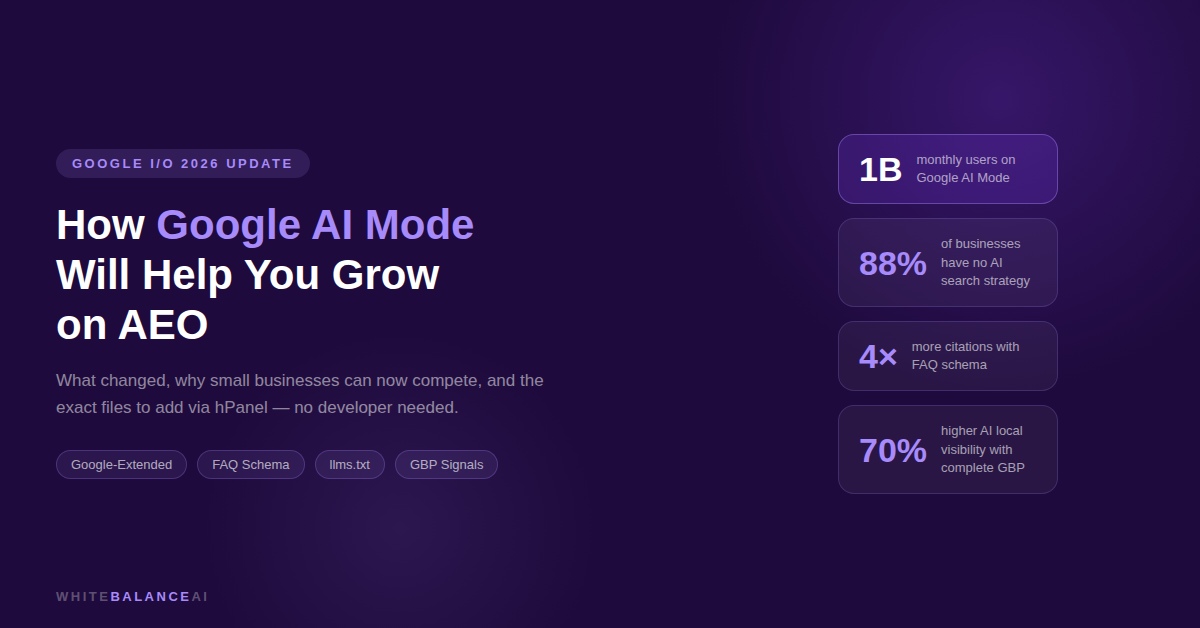
Google AI Mode AEO is Google’s AI-powered search experience. Instead of returning ten blue links, it generates a written answer, pulls from multiple sources, and presents the information directly to the user. AI Mode hit one billion monthly users in May 2026. Gemini 3.5 Flash is now the default AI model running inside it globally.
This is not a beta feature anymore. This is how a growing portion of your potential customers search for businesses like yours.
For Google AI Mode AEO, this matters enormously. Every optimisation step you take — structured content, FAQ schema, your robots.txt, your llms.txt — feeds directly into how AI Mode evaluates and cites your site.
What Google’s May 2026 Update Actually Changed
Google’s May 2026 Core Update confirmed something important: a page ranking number one in traditional search does not automatically appear in AI-generated answers. A lower-ranked page with better structure, fresher content, and clearer answers can out-cite the top result.
The brands winning in Google AI Mode AEO are not necessarily those with the most backlinks. They’re the ones creating clear, structured, trustworthy, and easily extractable content.
That is a fundamentally different game — and one a small business can win.
Why This Is Actually Good News for Small Businesses
Traditional SEO rewarded domain authority built over years. Large brands had a permanent structural advantage. Small businesses were always playing catch-up.
Google AI Mode AEO introduces a second track — one where content quality and structure matter more than accumulated authority. Pages with FAQ schema are four times more likely to be cited in AI Overviews. Businesses with complete, active Google Business Profiles are 70% more likely to appear in AI-generated local recommendations.
Most small businesses have a Google Business Profile already. Most of them just haven’t optimised it for AI Mode. That gap is your advantage.
The Exact Steps for Google AI Mode AEO
Step 1 — Check Google Search Console for the AI Mode signal
Open your Google Search Console. Look at your impressions vs clicks over the last six months. If impressions are rising but clicks and click-through rate are falling — that’s the AI Mode effect. Google is showing your content in AI answers, absorbing the traffic that used to reach your pages. This is your baseline. It tells you Google AI Mode AEO work is needed and it’s already starting to matter.
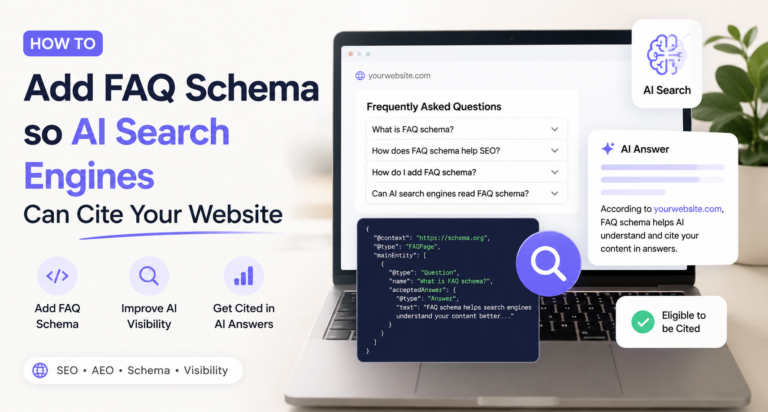
Step 2 — Add FAQ Schema to Your Key Posts (No Coding Required)
Pages with FAQ schema are four times more likely to be cited in Google AI Overviews. This is the single highest-return step in Google AI Mode AEO — and it takes about five minutes per post on WordPress with Yoast.
In your post editor, add a new block. Search for “FAQ” and select the Yoast FAQ block. Write five questions and answers directly into the block. Save. That’s the whole process. Yoast handles the schema code automatically. No developer needed.
Write your FAQ questions the way your customers actually ask them — conversational and specific. “How much does a WhatsApp chatbot cost for a small business?” not “What are the pricing considerations for WhatsApp chatbot implementation?”
Step 3 — Complete Your Google Business Profile
Businesses with complete, active Google Business Profiles are 70% more likely to appear in AI-generated local recommendations. Go through every section of yours. Fill in your services, business description, hours, and attributes. Upload new photos. Respond to every recent review. Post an update this week. Then keep it active — AI Mode treats regular updates as a trust signal.
Step 4 — Set Up the Three Files AI Crawlers Need
This is the most overlooked part of Google AI Mode AEO — and the one that determines whether any of your other work actually reaches AI systems.
Before Google’s AI Mode reads a single word of your content, it checks three things: whether it’s allowed to crawl your site, whether you’ve given it a structured guide to your site, and how current your content is. Three files control this. All three are added through your hPanel File Manager — no coding required.
File 1: robots.txt — The Access Gate
Your robots.txt file is at yoursite.com/robots.txt. It’s a text file that tells every web crawler — including Google’s AI crawlers — whether they can read your site.
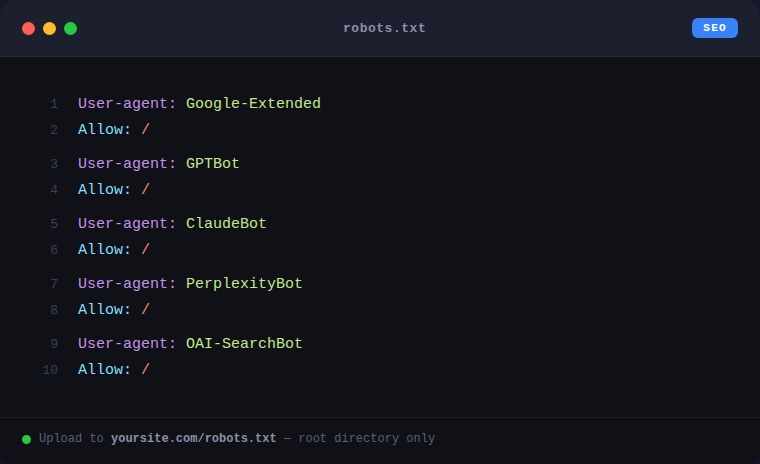
The key bot for Google AI Mode AEO is Google-Extended. This is the crawler specifically used for AI Overviews and AI Mode. If Google-Extended is blocked in your robots.txt, you will never appear in AI Mode answers regardless of how good your content is.
To check: type yoursite.com/robots.txt into your browser and look for any “Disallow” rules that affect Google-Extended or other AI bots.
To update: hPanel → File Manager → public_html → open robots.txt → add these lines:
File 2: llms.txt — Your Site’s AI Introduction
llms.txt is a file that sits at yoursite.com/llms.txt. Google’s traditional search crawler ignores it. But Google’s AI Mode, ChatGPT, Perplexity, and Claude all look for it.
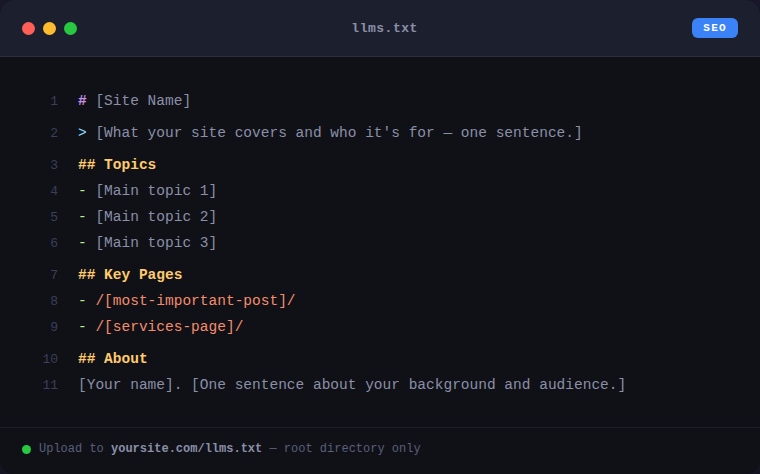
It tells AI systems: here’s what this website is about, here are the most important pages, here’s who runs it. Without this file, AI systems read your individual posts without any context about your site’s overall focus and authority. With it, they have a structured introduction that directly supports your Google AI Mode AEO work.
To add it: hPanel → File Manager → public_html → right-click → Create New File → name it llms.txt → paste your content → save.
A straightforward llms.txt for a small business or freelancer:
File 3: llms-full.txt — The Detailed Content Map
llms-full.txt goes at yoursite.com/llms-full.txt. It’s a more detailed version of llms.txt that summarises every important page on your site — what it covers, what question it answers, who it’s for.
This file is a direct Google AI Mode AEO signal. When AI Mode is deciding which source to cite for a specific query, a clear, accurate summary of your post in this file gives you an advantage over sites that don’t have one.
Add it through File Manager the same way as llms.txt. For each key post, include:
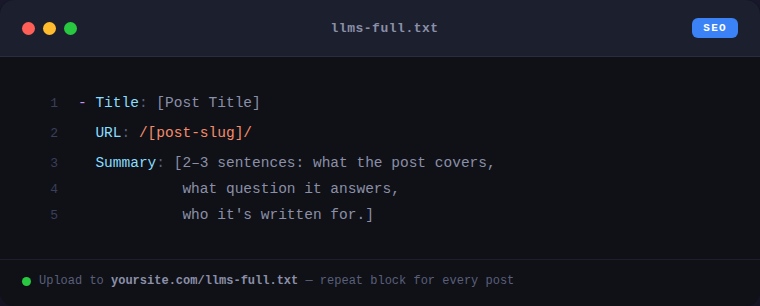
Update this file every time you publish something new. It keeps your Google AI Mode AEO content map current.
Step 5 — Rewrite Your Post Openings to Lead With the Answer
Take your five most-visited posts. For each one, identify the main question it answers. Then rewrite the opening paragraph of every major section so the first sentence directly answers that question.
AI Mode scans the opening of each section to decide if it’s relevant. If your opening is warm-up and context, the AI skips to the next source. If it’s a direct answer, you stay in the running for a citation.
Step 6 — Write Only What AI Can’t Generate Itself
Google’s May 2026 guide is direct on this: generic summaries that AI can generate itself add no citation value. Only content reflecting genuine expertise, original research, or first-hand experience earns inclusion in Google AI Mode AEO answers.
For a freelancer or small business owner, this means writing from what you actually know. A post that includes a real client result, a specific friction point you personally hit, or a lesson from your own experience will consistently out-cite a polished generic overview. Your lived experience is a Google AI Mode AEO asset that no large content operation can replicate.
What to Expect in the Next Six Months
The lift from invisible to cited has never been smaller than it is right now — and that window closes as more businesses start waking up to Google AI Mode AEO this year.
The businesses that set up their robots.txt correctly, add their llms.txt and llms-full.txt files, add FAQ schema to their key posts, and keep their content fresh over the next three to six months will have a structural citation advantage that compounds. Late movers will pay more time and effort to reach a baseline that early movers are already building on.
Google AI Mode isn’t something to survive. For small businesses and freelancers willing to follow the steps above, it’s the most accessible opportunity search has offered in years.
Frequently Asked Questions
What is Google AI Mode?
Google AI Mode is an AI-powered search experience that generates conversational answers while linking to relevant web sources. It allows users to ask follow-up questions and explore topics more naturally. It is powered by Google’s Gemini models.
How do I optimize my website for Google AI Mode?
Create helpful content that answers user questions clearly, organize pages with logical headings, use structured data where appropriate, maintain technical SEO, and regularly update your content. These practices help both Google Search and AI-powered experiences.
Does Google AI Mode replace traditional search?
No. Google AI Mode complements traditional search by providing AI-generated answers alongside links to relevant websites, giving users multiple ways to explore information.
Is SEO still important for Google AI Mode?
Yes. Google states that optimizing for generative AI search is still fundamentally SEO. Strong technical SEO, high-quality content, and a good user experience remain the foundation for visibility.
Can small businesses benefit from Google AI Mode optimization?
Yes. Businesses that publish useful, trustworthy, and well-structured content can improve their chances of appearing in AI-powered search experiences alongside traditional search results.
👋 About the Author
I’m Urmi Banerjee, founder of WhiteBalanceAI. I deploy high-performance websites and automated workflows using modern low-code infrastructure. If you’re looking to optimize your digital platform for the AI Search Era—including ChatGPT, Perplexity, Google AEO, and other AI-powered search experiences—or build automated revenue systems that streamline lead generation and customer acquisition, let’s connect at WhiteBalanceAI.com. I handle the technical architecture and system integration so you can focus on growing your business.
Visit WhiteBalanceAI →🌿 Want to see AEO in action?
Caloriematterss is a real-world niche food blog built with AEO (Answer Engine Optimization) and GEO (Generative Engine Optimization) principles from the ground up. Explore how structured recipes, FAQ schema, internal linking, and AI-friendly content work together in a live website.
Visit Caloriematterss →⭐ Found this helpful? Add WhiteBalanceAI as your Google Preferred Source so these WordPress guides show up more often for you. Set WhiteBalanceAI as a preferred source →
🚀 Starting your first website?
The platform you begin on shapes your speed, security, and how little you have to fight with later. The one I use and recommend is Hostinger — simple enough for a non-technical owner, runs WordPress cleanly, and handles the hosting essentials so you don’t manage servers.
Start with Hostinger →Disclosure: this is an affiliate link. If you sign up through it, I may earn a small commission at no extra cost to you. I only recommend tools I actually use and trust.
You may like These How To FIx Reddit Subreddit Posting Error 7 Common WordPress Errors And How To Fix Them